How to add a new attribute?

eye 24thumbs up 0thumbs down 0clock 16 March 2026

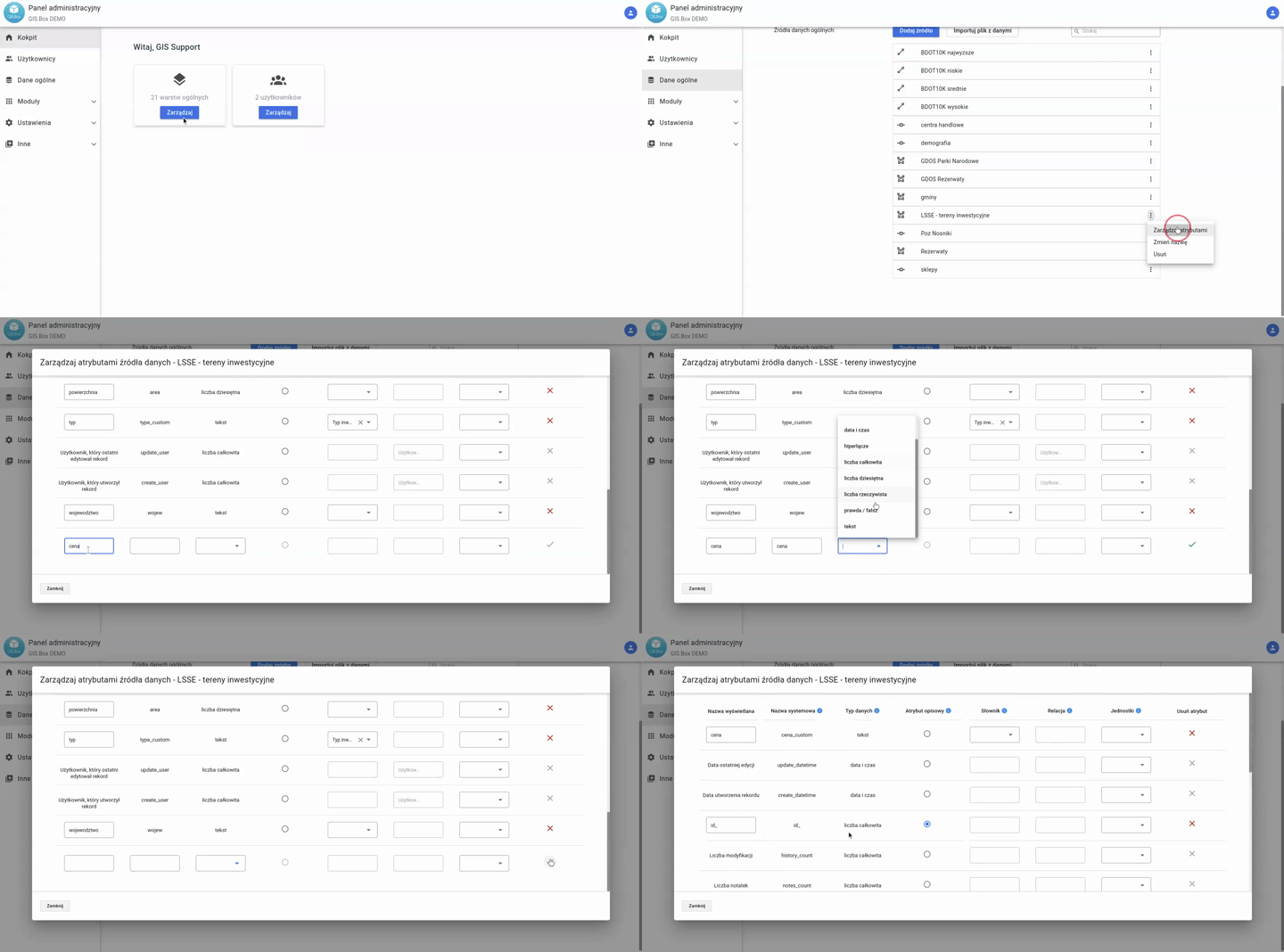
To add a new attribute:

  1. Go to Administrator Panel -> General Data -> Data Sources tab.
  2. Click the three dots next to the name of the Source to which you want to add an attribute.
  3. The Attribute Structure Manager will open.
  4. At the bottom of the list of existing attributes, there is a row where you can enter the data. Fill in:
    1. Display name: The name of the attribute that will appear in the system.
    2. System name: The name of the field in the database. If you do not have specific database-related requirements, simply enter a name without spaces or Polish characters.
    3. Define the Data Type.
    4. [optional] Define the Descriptive Attribute.
    5. [optional] Assign a previously prepared Dictionary (read more about Dictionary Management)
    6. [optional] Select a unit.
  5. If the checkmark on the right side turns green, click it.
  6. The changes will be saved.

Was the article helpful?

Previous article

How to delete an attribute?