eye 0thumbs up 0thumbs down 0clock 7 April 2026
Usemaps

Next-generation platform for managing data on maps

For teams whose data does not exist in tables - but on plots, poles or underground. In specific locations.

Problem

Without a map, your team is working on assumptions

The data exists. But everyone has a different version of it - in Excel, in their head or in an email from last week

Outdated Excel files

Someone updated the data in the field. The file in the cloud does not reflect it yet. The version on the laptop does not either. No one knows which version is correct.

Reporting

How many projects are at the permitting stage? To answer this, you need to call three people, review two Excel files, and check your email inbox. And you still are not sure if the data is up to date.

Knowledge exists only in people’s heads

Michał knows that this pole was replaced. Kasia remembers that this plot has an access issue. But what if Michał and Kasia are not available?

Constantly having to ask for updates

“Are these the latest data?” This question is asked several times a day. Every answer takes time - and still does not provide certainty.

Solution

One system. The whole team. Up-to-date data.

Usemaps replaces the chaos of files and copies with a single platform - where spatial data is available to everyone, always in the same, up-to-date version.

A single source of truth

Usemaps is your company’s internal spatial data cloud. All maps, layers, and project data in one place - instead of scattered across drives, emails, and local folders.

Why it matters:

Your team will start using spatial data. Even those who are not familiar with GIS

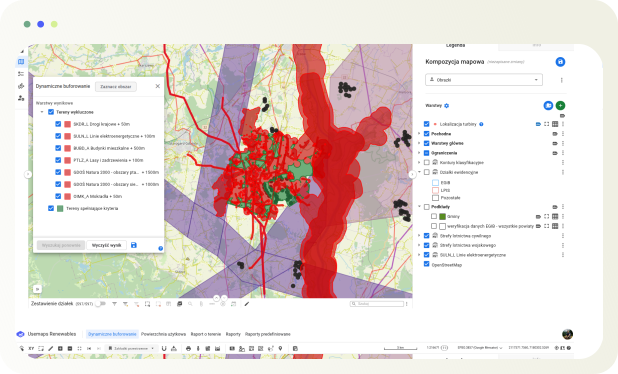
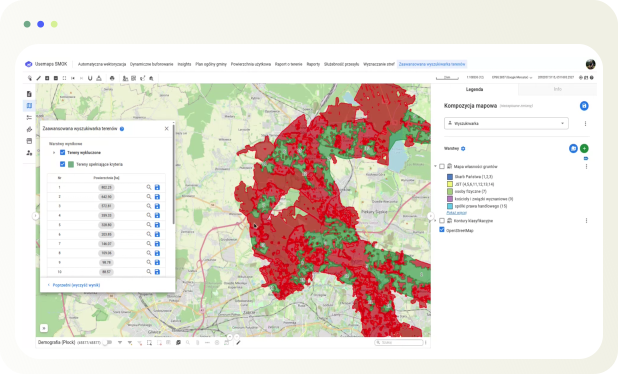
UseMaps is designed so that the entire team can use spatial data - not just the GIS specialist. The project manager sees the status of plots on the map. The lawyer attaches documents to specific locations. Management reviews the portfolio with a single click.

Using QGIS? Usemaps is Your new best friend

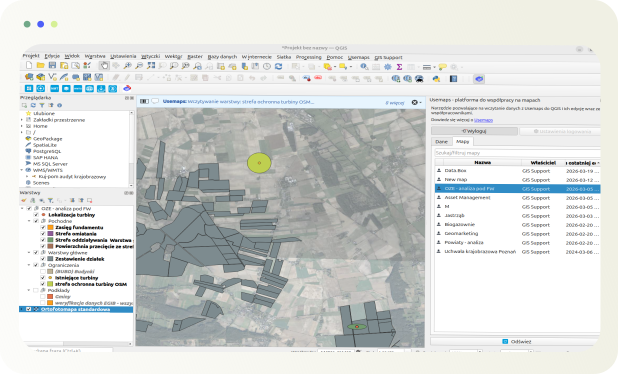
Usemaps integrates natively with QGIS - you can work in the environment you know, while data syncs automatically across the entire organization. No exporting, no sending files, no “it works differently on my machine.”
Industry use cases

See how Usemaps works in your industry

Usemaps & QGIS

QGIS on your computer. Usemaps for the entire organization.

Thousands of GIS specialists work in QGIS. The problem is that their analyses, layers, and data remain on local disks – unseen by the rest of the team. Usemaps is a platform that eliminates data chaos and enables access to maps for everyone in the organization

Do you use QGIS? Usemaps is its natural extension

QGIS is a powerful analysis tool - but the data you create stays on your computer. Usemaps moves it to the cloud, shares it with your team, and ensures that everyone - in the office, in the field, or in a client meeting - sees the same data. No file sharing, no asking “which version is current?” and no loss of work when someone leaves the company.
  • Import data from QGIS with a single click – the Usemaps plugin for QGIS synchronizes layers directly from the project, with no manual export required
  • Your analyses visible to the entire team – everything you do in QGIS is instantly available in the browser and on the phone of every team member
  • Work in QGIS, share in Usemaps – you keep your workflow while adding team collaboration
  • Data in the cloud, always up to date – no more sending SHP files by email
  • Access without QGIS – your team, clients, or management can view the map in a browser, with no installation required

Key benefits of Usemaps

With Usemaps, you'll unlock entirely new opportunities for business growth.

Implementation and support

We won’t leave you with just the application

Implementing a new tool in an organization is not just about technology - it’s about changing the way the entire team works. Our team will guide you through every step: from configuration and data import to user training, so you can start using Usemaps from day one.

Real people are behind Usemaps

Usemaps also means our team, who will guide You through the entire implementation process. We know what to watch for and how to avoid mistakes that can cost weeks.
Integrations

Data integration is in Usemaps’ DNA

Integration with Google Maps allows you to use Google tools (address search, route planning) directly within Usemaps.

Integration with QGIS allows you to load data from GIS.Box into QGIS Desktop and edit it in multiple users.

Usemaps integrates with all Geoportal.gov.pl services (including ULDK). All data from Geoportal can be accessed in Usemaps.

Request a quote

We'll answer all your questions

Ask
for price

Ask
for price