28
28 0
0 0
0 21 July 2026
The print tool is used to generate map prints.
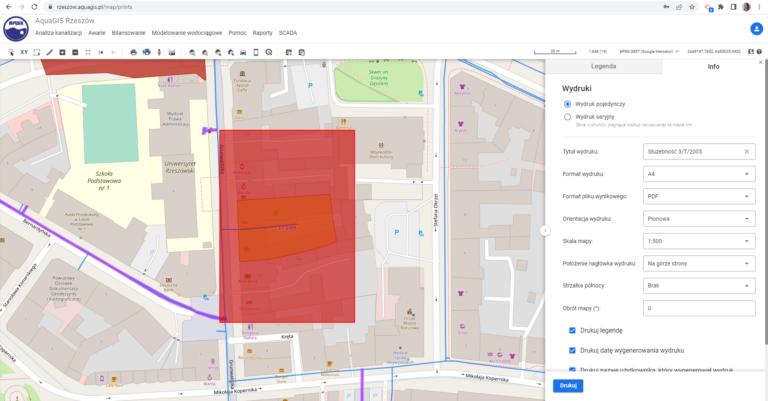
After selecting the Print tool from the Map Panel Toolbar:
- the Print Layout Panel appears in the Information Panel
- A red print extent indicator appears in the Map Window.
The Print Layout Panel includes the following options
- Single print
- Batch print
For a single print, the user selects the area in the map window by dragging the area while holding down the left mouse button.
For a single print, we can select the following parameters:
- Print title [Text entered by the user]
Allows defining a custom title instead of printing the application name. The user can enter their own text, but the title is not mandatory. The user can print with an empty title. - Print Format [A4, A3, A2, A1, A0]
- Output file format [JPEG, PDF, PNG]
- Print orientation [Portrait, Landscape]
- Scale [1:250, 1:500, 1:1000, 1:2000, 1:5000, 1:10000, 1:15000, 1:20000. 1:25000, 1:40000, 1:50000, 1:100000]
- Print header position [Bottom of the page, Top of the page]
- North arrow [None or select 1 of 3 options]
- Map rotation [default 0; the map print can be rotated by specifying a rotation angle]
Additionally, we can specify:
- Whether to print the legend?
The legend will be printed on the next page.
For graphic formats such as JPEG and PNG, the legend is printed in a separate file. The print output will be generated as a ZIP package containing the map print file and the legend file. - Whether to display the print generation date on the printout?
The print generation date will be placed in the print header. - Whether to print the name of the user who generated the print?
The system username of the user who generated the print will be placed in the print header. - Whether to print the application logo?
The system logo will be printed in the print header. - Whether to print the information clause?
The information clause will be included in the print header. - Whether to split the print into A4 sheets?
By clicking “Print,” we send a print request. Depending on the selected parameters, this may take several minutes.