20
20 0
0 0
0 17 January 2026
Configuration in the Administrative Panel
The administrator defines non-spatial layer attributes such as: name, description, responsible person, completion date, status, and also sets the statuses that indicate open tasks.
To configure the Tasks module, You should:
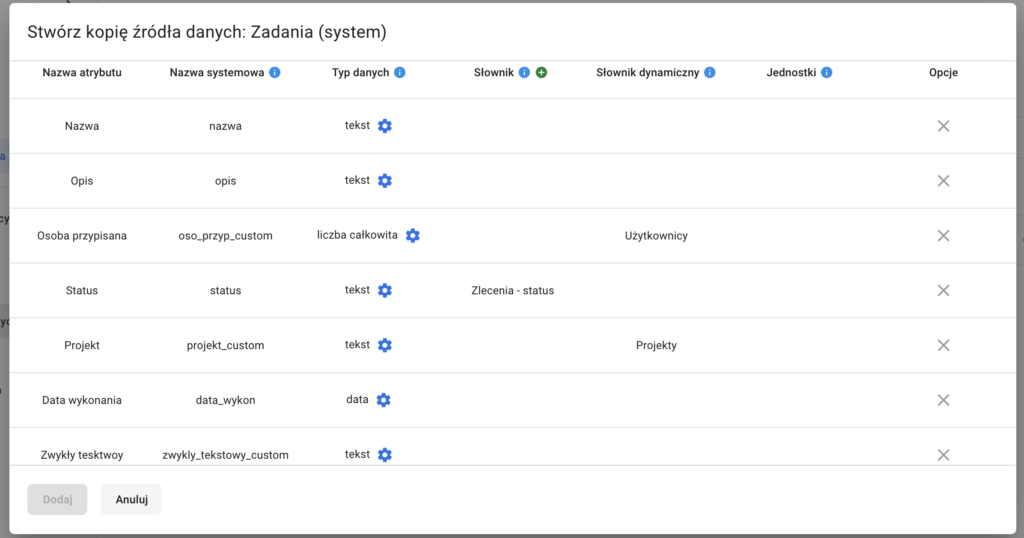
- Add a new data source (geometry type: no geometry)
- The data source should include attributes to store:
- Nazwę (typ danych: tekst)
- Description (data type: text)
- Status (attribute of data type text, linked to a predefined dictionary)
- Task completion date (data type: date)
- Assigned person (data type: integer, linked to a dynamic dictionary
Użytkownicy)
3. Next, create a layer based on the above data source
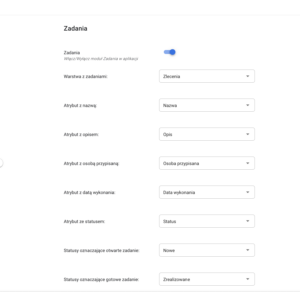
4. Go to the Tasks module and fill in the following:
- Task layer: select the layer created in the previous step.
- Name attribute: text field containing the task name
- Description attribute: text field containing the task description
- Assigned person attribute: field linked to the dynamic dictionary.
Użytkownicy - Completion date attribute: field containing the task completion date.
- Status attribute: field linked to the dictionary containing task statuses.
- Open task statuses: select the values from the status attribute dictionary that should be considered as open tasks (e.g. new, in progress).