

 22
22 0
0 0
0 23 February 2026
While viewing the map, a user may encounter a situation that requires consultation with another person who has more knowledge, for example about the sewer network. If the situation is not urgent, the user can use the Geonotes tool. However, if a quick consultation is needed, they can easily generate a link to share exactly what they see on their screen.
So how do you generate a link to the map view?
- The user opens Usemaps, selects the Map, and navigates to any desired location
- On the toolbar, at the far right next to the “System Information” icon, there is the “Share Map View” icon
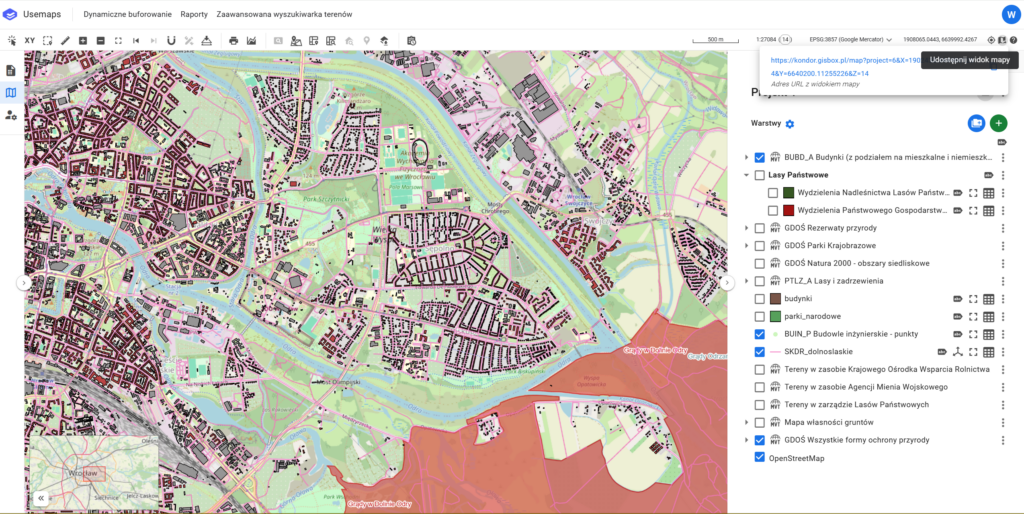
3. After clicking it, a link will appear that can be copied and shared with other users.
Important!
The link directs to a location within the Map. Keep in mind that the user receiving the link must also have access to the sender’s Map in order to see all the layers the sender was using (provided they have the necessary permissions). If the user does not have access or the project has been deleted, they will be taken to the same location but within the default Map