

 33
33 0
0 0
0 6 July 2022
The Layers List is a list containing the Layers saved in the Project. The Layers List is located in the Legend Panel
Each layer type has its own set of specific tools
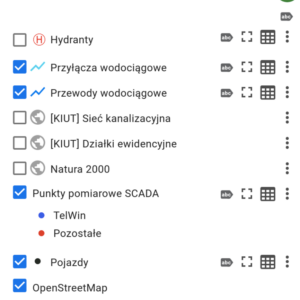
Vector Layer Tools:
- Checkbox for Turning Layers On and Off (allows you to enable or disable the map visibility in the Map Window)
- Graphical Representation of Layer Symbology (configured in the Symbology Manager)
- Layer Name
- Show/Hide Labels (label symbology and visibility are set in the Symbology Manager; this tool is only used to quickly turn labels on or off for map presentation purposes)
- [Optional] Enable Direction Arrows
- Show Layer Extent
- Open Layer Attribute Table
- Layer Transparency Management
- Change Style
- Refresh
- Remove – deletes the layer from the Map
WMS Layer Tools
- Checkbox (ptaszek!) Włączania i Wyłączania Warstw (pozwala włączyć i wyłączyć widoczność mapy w Oknie Mapy)
- WMS Symbol (the system does not display the WMS legend)
- Layer Name
- Manage Layer Transparency
- Remove – deletes the layer from the Map
MVT Layer Tools
- Checkbox for Turning Layers On and Off (allows you to enable or disable the map visibility in the Map Window)
- MVT Symbol
- Layer Name
- Manage Layer Transparency
- Remove – deletes the layer from the Map
General Tools
- Managing Layer Display Order
- Layer Grouping