

 33
33 0
0 0
0 16 March 2026
The Usemaps Geoportal allows the creation of a secure data viewer using data stored in the System, which is publicly accessible (does not require login).
Example of use
Map Viewer Puszcza Zielonka Intermunicipal Association
Employees of the Association work in the System (through the Map Viewer and in QGIS), updating data on the routes and completion dates of individual sections of the sewage network.
There was a need to create an easy-to-use viewer for residents, allowing them to find out if and when sewage connections will be built near their property.
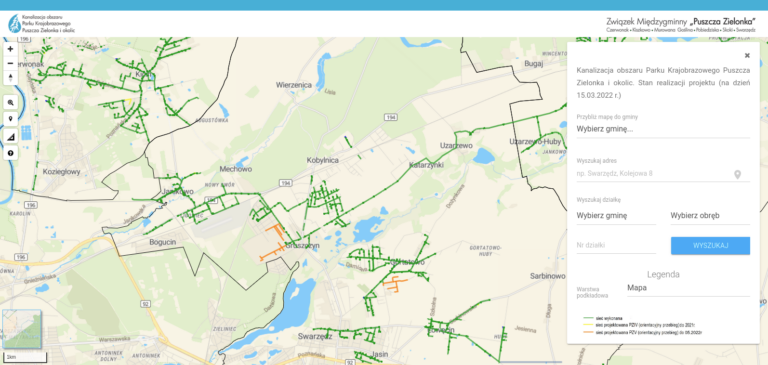
The Geoportal is a very effective solution, as residents can independently and quickly check the completion date of the sewage system in their area.
How does it work?
The Usemaps Geoportal is essentially a separate application that can be installed on another server. It has its own internal Administration Panel (accessible at yourpublicmapaddress/admin), where the System administrator can log in and configure:
- The logo and site icon
- The application name
- Map view (default extent)
- A set of layers from the System that should be displayed on the public map.
- Layer attributes on the public map are displayed according to the Object Card configuration in the parent application.
- Layer attributes on the public map are strictly displayed values from the parent application and are not additionally formatted, mapped, or modified in any way.
- The satellite application does not support change history, notes, attachments, or relationships.
Layers come from the System (main application) – if you need a layer in a different style or an Object Card with fewer fields, return to the main application and prepare layers dedicated to the satellite application with the public map.
After configuration and saving changes, the Geoportal fetches data from the System and creates a local copy. This ensures that using the Public Map does not require communication with the System, helping to prevent issues such as DDoS attacks.
To update layers published on the public map, you need to remove the layer in the administration panel and add it again. For the security reasons mentioned above, data is stored and served internally. The public map does not query the parent application for the layer’s status or the number of new elements that may have appeared in the source. The state of a layer displayed on the public map corresponds to the moment it was added in the public map’s administration panel.