

 87
87 1
1 0
0 7 April 2022
Labels are text displayed next to an object on the map, and labeling is the process of configuring these labels. It is simply text on the map, for example, the name of a town next to its outline or the name of a river along its course.
Labels are widely used for quick visual identification of objects and also provide informational value on printed maps.
Labels are configured in the Symbolization Manager, in the right-hand section.
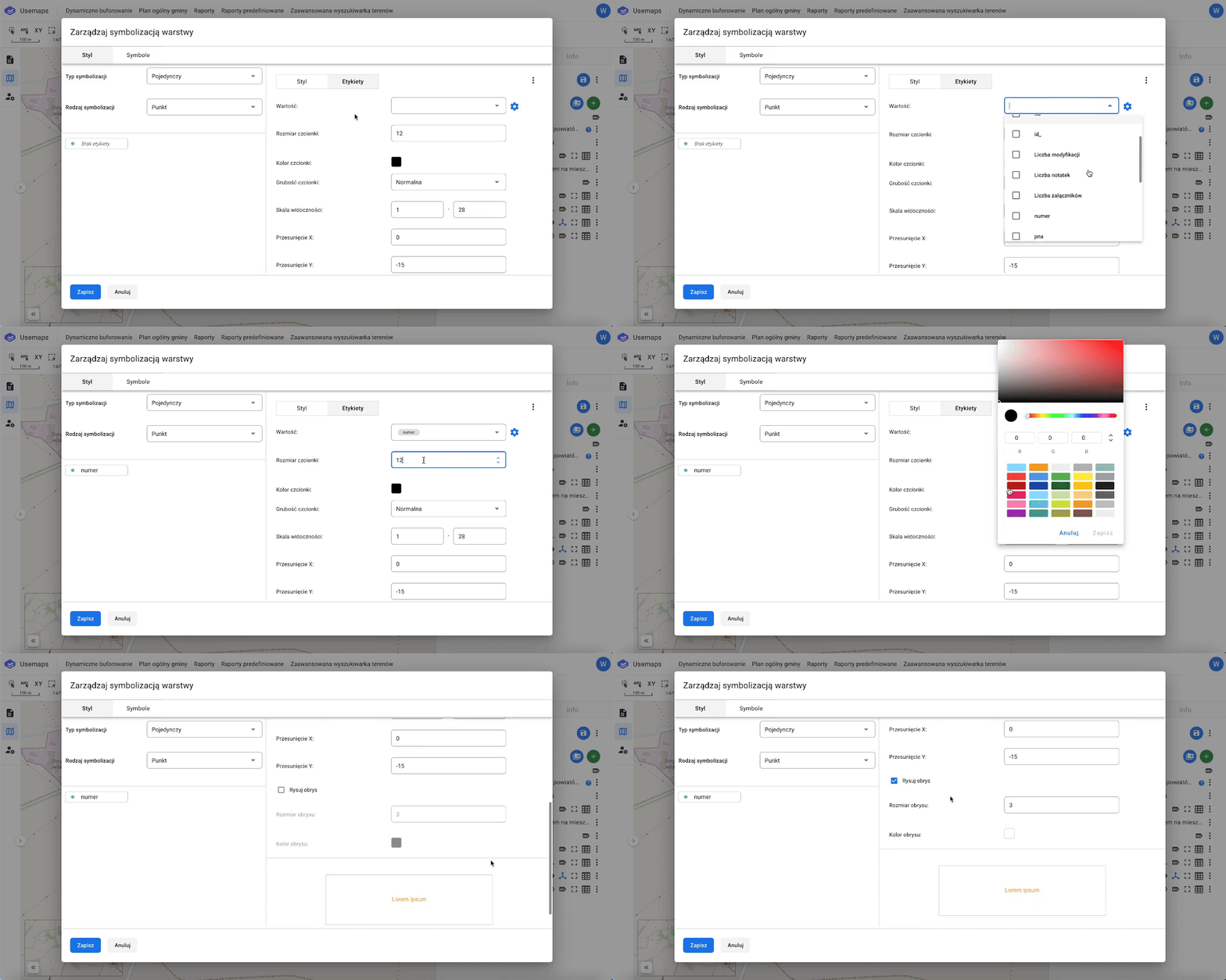
Labeling Settings
- Value – we can select one or more attributes that will make up the label.
- Font size – this is the size of the font in points.
- Font color – any color from the RGB palette.
- Font weight – normal or bold.
- Visibility scale – the scale value above which the font will be visible. For example, selecting 17 means the font will be visible at scales from 17 to 22.
- X Offset – the label’s horizontal displacement along the X-axis (to the right<>left). The displacement is measured from the centroid of a point or area. Adjusting the X offset does not apply to lines.
A line label is always displayed at the center of the line feature. - Y Offset – the label’s vertical displacement along the Y-axis (up<>down). This allows you to position the label above, below, or centered on the object.
- Outline, also called halo. It is recommended to add a light outline, as it makes the text more visible on a dark background.
- Outline color – the halo color
- Outline size – the halo size