

 0
0 0
0 0
0 23 September 2026
Usemaps is constantly evolving, and an important source of these changes is the experience and needs of people who use the platform every day. Based on their feedback, we identify areas where workflows can be simplified, the number of steps reduced, and access to data made easier, including for people who do not work with GIS on a daily basis.
During the “What’s New in Usemaps?” webinar, we presented some of the changes we have been working on over the past few months. These included both smaller improvements to everyday workflows and major new features related to object identification, data loading and validation, document management, and the calendar.
Faster Object Identification
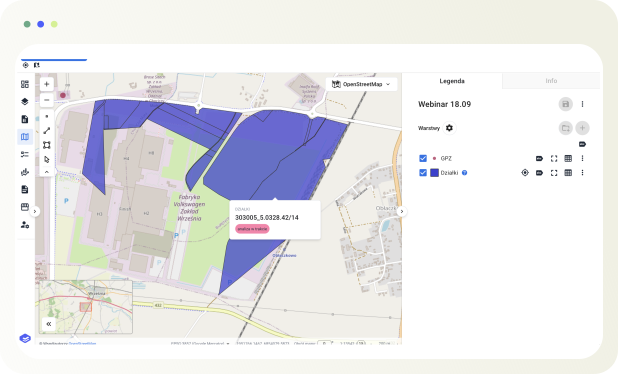
One of the first changes presented during the webinar was the new way of identifying objects on the map. Previously, to view information about a specific object, users had to click on it, which opened its data along with the attribute table. When quickly browsing the map, this meant taking additional steps that were not always necessary.
The new identification feature allows users to preview key information simply by hovering over an object. A configurable pop-up appears, displaying selected attributes. This also works when multiple layers are visible on the map, making it easy to quickly check information about different objects without switching between layers.
The way information is displayed after clicking on an object has also changed. Users are now taken directly to the object card, while the attribute table is opened only when it is actually needed. This is particularly useful for people who mainly use the map to quickly find and check information rather than for advanced GIS data work.
Drawing Directly on the Map – Point, Line, Polygon
Another new feature is a panel with quick-access drawing tools. It allows users to quickly add a point, line, or polygon directly to the map without editing existing layers. This makes it possible to create temporary geometries, take measurements, or test different variants without modifying the source data.
During the webinar, we demonstrated this using the example of planning a preliminary cable route. The drawn line can be edited, different route variants can be compared, and the length of both the entire route and individual sections can be measured.
The new panel offers even more possibilities. The created geometry can serve as a starting point for further work with the data. Users can choose to download it, create a new layer based on it, or add the object to an existing layer.
Data on the Map with Drag & Drop
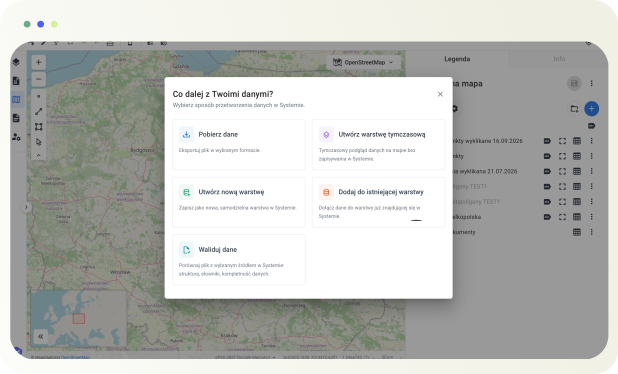
Another new feature is the ability to quickly load data by dragging and dropping a file directly onto the map. There is no need to open the data in QGIS first or go through additional steps just to check the contents of a file you have received or found on your computer.
After dragging and dropping a file, Usemaps first allows users to display the data as a temporary layer. They can review it and then decide whether they want to use it further. During the webinar, we demonstrated this feature using a GeoJSON file, but the solution is also being developed to support other formats commonly used in everyday workflows, including DXF files received, for example, from designers.
Quick Data Validation
When working with subcontractors or other external partners, spatial data often comes in different formats and with varying levels of completeness. Checking each dataset can require a significant amount of additional work, especially when a large number of files needs to be verified.
In Usemaps, this process can be simplified through data validation. Once a file has been loaded, users can compare it with the structure of a selected layer and quickly check, among other things, whether the geometry type and attributes match, whether predefined values are correct, and whether individual fields are complete. The system also shows how fully each attribute has been populated.
The results are available without first adding the data to a layer or preparing additional scripts and reports. This makes it possible to quickly assess the received file and determine whether the data meets the defined requirements.
Working with Data from a Selected Project Only
With large datasets, users do not always need access to all objects at the same time. A good example is parcel layers, which may contain tens of thousands of records, while a specific project may involve only a small subset of them.
The new project filter allows users to limit the view to data associated with the currently selected project. When a project is opened, the map automatically zooms to the relevant area, allowing users to work only with the objects linked to that project. There is no need to create additional, separately filtered layers.
Calendar Connected to Data in Usemaps
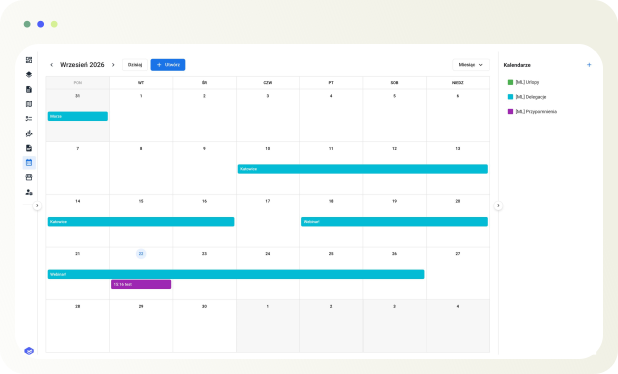
One of the major new features presented during the webinar was the calendar. Its key feature is its connection to data already stored in Usemaps. Objects with date attributes can be displayed directly in the calendar. These may include, for example, the date of the next contact, an infrastructure inspection date, or the duration of a contract.
After clicking an event in the calendar, users can open the card of the related object and view its details, relationships, notes, or documents. If the event is linked to a specific parcel, users can also view its location directly on the map.
The calendar is complemented by notifications and a reminder system that is currently being developed. This will allow the system to notify users in advance about upcoming deadlines, such as the end of a contract.
Documents Linked to Objects and the Map
Until now, documents in Usemaps could primarily be added as attachments to specific objects. This worked well when working with individual objects, but made it more difficult to browse all the documentation stored in the system. That is why Usemaps now includes a dedicated Documents panel.
It allows users to browse and search documents in one place while keeping them connected to other data in Usemaps. Relationships, notes, and comments can be added to documents, and if a document is linked to a specific object, its location can also be viewed on the map. A quick file preview is also available for images, PDF documents, and other files, so users do not need to download a file every time they want to check its contents.
Usemaps + EZD RP – Cases on the Map
During the webinar, we also presented the ongoing integration between Usemaps and EZD RP. Its aim is to add spatial context to information about cases and documents, which is particularly important for public institutions. Usemaps does not replace the EZD system, but allows the information stored within it to be linked to specific objects on the map.
For example, an existing case from EZD RP can be linked to a specific cadastral parcel, allowing users to view the related correspondence. The information is updated whenever changes are made in EZD, enabling users to work with it directly within the spatial context of Usemaps.
This makes it easier to check which cases relate to a specific parcel or its surrounding area, without relying solely on parcel numbers or case reference numbers.
Want to See Usemaps in Action?
If you would like to see how Usemaps can support work with data and projects in your organization, we invite you to a presentation of the platform.