

 0
0 0
0 0
0 14 January 2026
The latest version of the GIS Support Plugin will be enhanced with tools integrating the Plugin with Usemaps – a platform for collaboration on maps.
Why? What for?
QGIS is fantastic software for professionals who collect and process data and provide their organizations with information and knowledge (Situation 1 in the figure below). As the use of GIS in organizations grows, issues arise that QGIS alone cannot handle. This primarily involves working with multiple people. Every (well, almost every) GIS specialist wants their colleagues to have easy and convenient access to the data they have prepared.
Then GIS specialists look for solutions. To begin with
- using geopakages on a network drive
- installing PostgreSQL + PostGIS and uploading QGIS projects there (Situation 2 in the figure below)
These are good ideas, but they have one drawback: it is very difficult to persuade non-GIS professionals to use QGIS. In order to view a map with a network and customers, a customer service representative, board member, or salesperson must open a program with dozens of buttons, connect to a database, and be prepared for some problems with coordinate systems… This rarely works well. People are simply afraid. And no wonder.
Naturally, ideas arise related to preparing a browser-accessible solution for these users. And then GIS specialists find:
- QGIS2Web (works, but only for really simple uses)
- Lizmap – here is our opinion about Lizmap
- Q2WC2 – this is “only for eagles”
OK, if the GIS specialist has administrative and programming knowledge, it will work. Unfortunately, only in the short term, because the requirements related to data maintenance and complaints about speed will only increase.
Additionally, issues may arise related to:
- attachments to objects: this has always been a problem for GIS
- permissions: we don’t want everyone to have access to everything in edit mode
- change history – who changed this customer’s contact details and when?
- And the biggest nightmare: local copies of files—it is impossible to prevent users from making local copies and working on outdated data.
Sound familiar?
How can Usemaps help?
Quickly and easily. Technically, Usemaps is an application installed on a server accessible via a web browser. This is where data and user accounts with their permissions are stored, and where easy-to-use tools for users and administrators are located. This data can be accessed from QGIS via a plugin. Everything is easy to configure and has a visually appealing layout.
In summary, with Usemaps we can obtain situation 3 from the figure below:
- User data and accounts are in Usemaps
- GIS professionals connect QGIS to Usemaps via a plugin
- Other users connect via a browser
- Everyone works on the same data. They can edit it in a browser and in QGIS.
- The Usemaps administrator manages permissions using the tools in the Administration Panel.
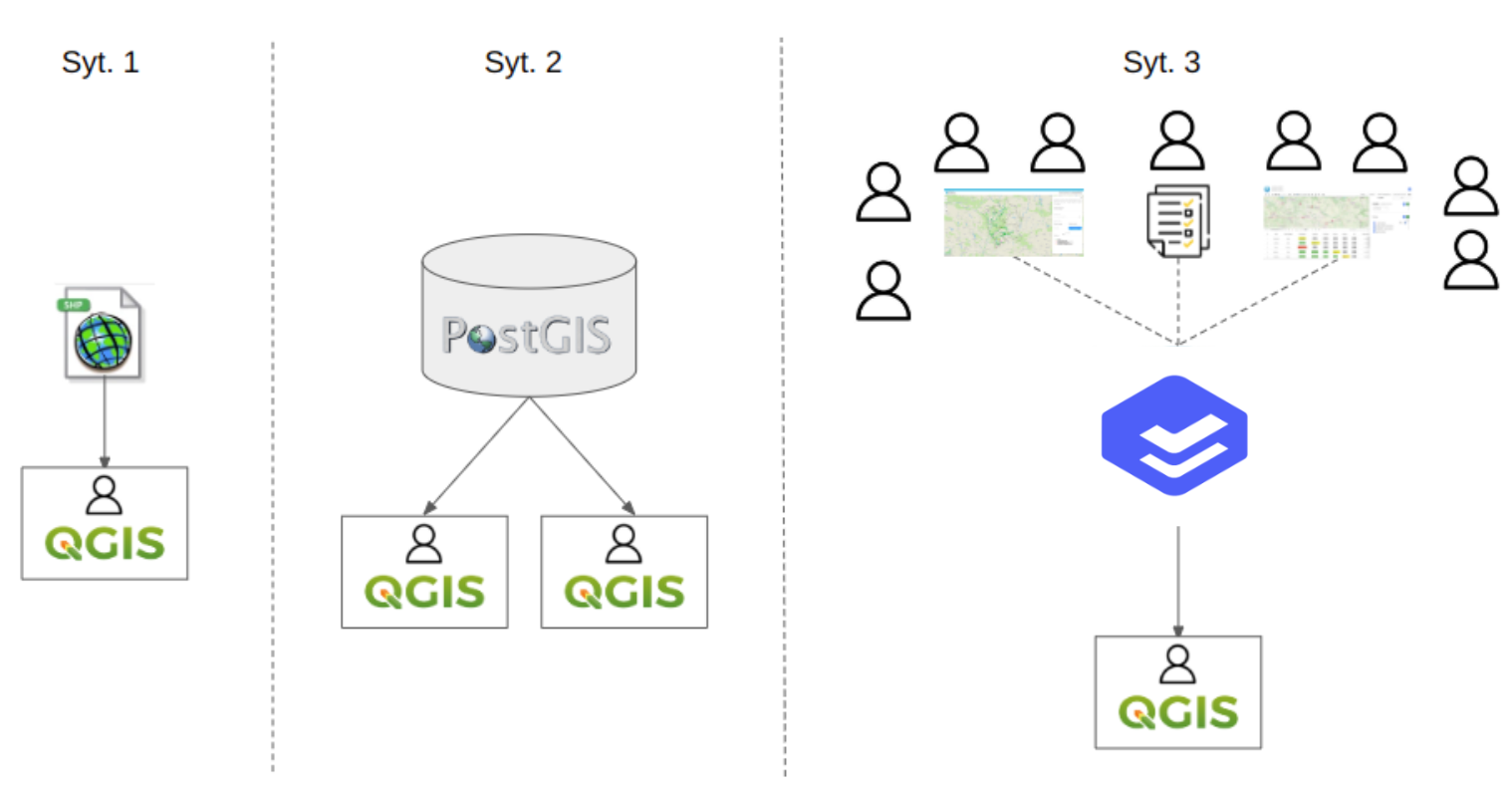
The migration from a simple solution (Situation 1) to a solution based on Usemaps (Situation 3) is presented in the video below.
Benefits of using Usemaps:
- Scalability – granting GIS access to another person in the organization takes 2 hours and 1 minute. One minute to set up an account, and two hours for basic training.
- Control over the validity of data
- Access to data for a wide range of users via a web application
- GIS simplification: by using features such as profile pictures or color dictionaries, it is possible to create a very user-friendly tool.
- Security: the ability to perform backups, change history, data access permissions. These are features that affect the security of stored data.
You can test how it works right now. Using the plugin you have in QGIS, you can connect to the demo version of Usemaps and download data from there. Would you like to test it yourself? Feel free to contact us!