

 1
1 0
0 0
0 11 November 2021
A layer is the basic form of organizing spatial data in GIS. It is one of the fundamental concepts in GIS.
A map (cartographic composition, visualization) in GIS consists of multiple layers overlaid on each other.
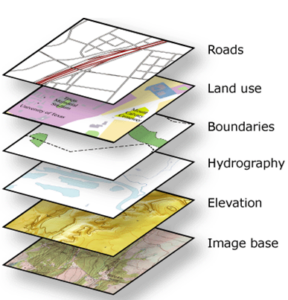
Layer Management in the System
Layers are managed by the Administrator in the Administrative Panel, in the Layers section.
Base Layer (Basemap)
In GIS systems, a base map (so-called basemap) is very commonly used. It is usually a general cartographic composition that provides an overall view of the space being explored. In the System, the default base layer is a map sourced from OpenStreetMap (How to add a new map basemap to the System?).
Layer from a source
A layer from a source is a basic type of Layer in the System. Such a Layer
- It has a specified Geometry Type (inherited from the Data Source on which it was created).
- A layer consists of Objects.
- It can be assigned an individual style (Vector Layer Symbolization).
Layer from a source (with filter)
This is a special case of a layer from a source that has a filter applied. For example, from a source containing all counties in Poland, by applying a filter like “province = Greater Poland,” we obtain a layer containing only the counties from the Greater Poland province. This feature allows creating, for instance, 16 separate layers from a single source, each representing the counties of a different province.
Note!
When creating new objects, make sure you have filled in the attributes that determine the object’s appearance in the layer, e.g., dzielnica= Bielany. Otherwise, you will receive the message: No objects with the identifier… meet the specified condition.
WMS Layer
A WMS layer is a layer whose source is an external WMS service.
- A WMS layer is added by specifying the WMS data source URL. See: How to add a WMS Layer to the System?
- WMS layers cannot be edited or assigned their own styling.
- A WMS layer may load slowly because its speed depends on the capacity and load of the WMS server.
- A large number of WMS layers in a project can slow down map display.
Non-Spatial Layer
A Non-Spatial Layer is a special type of Layer.
It is characterized by the fact that it does not have Geometry, and therefore cannot be displayed on the map. However, it is very useful and is used in various actions performed within the System.
Examples:
- All hydrants are grouped into a layer (because they are objects of the same type).
- All water pipelines also form a layer.
- A layer also includes an orthophotomap loaded via WMS.