

 1
1 0
0 0
0 24 October 2022
The Attribute Painter tool allows you to copy filled attributes from a specified source object to selected target objects.
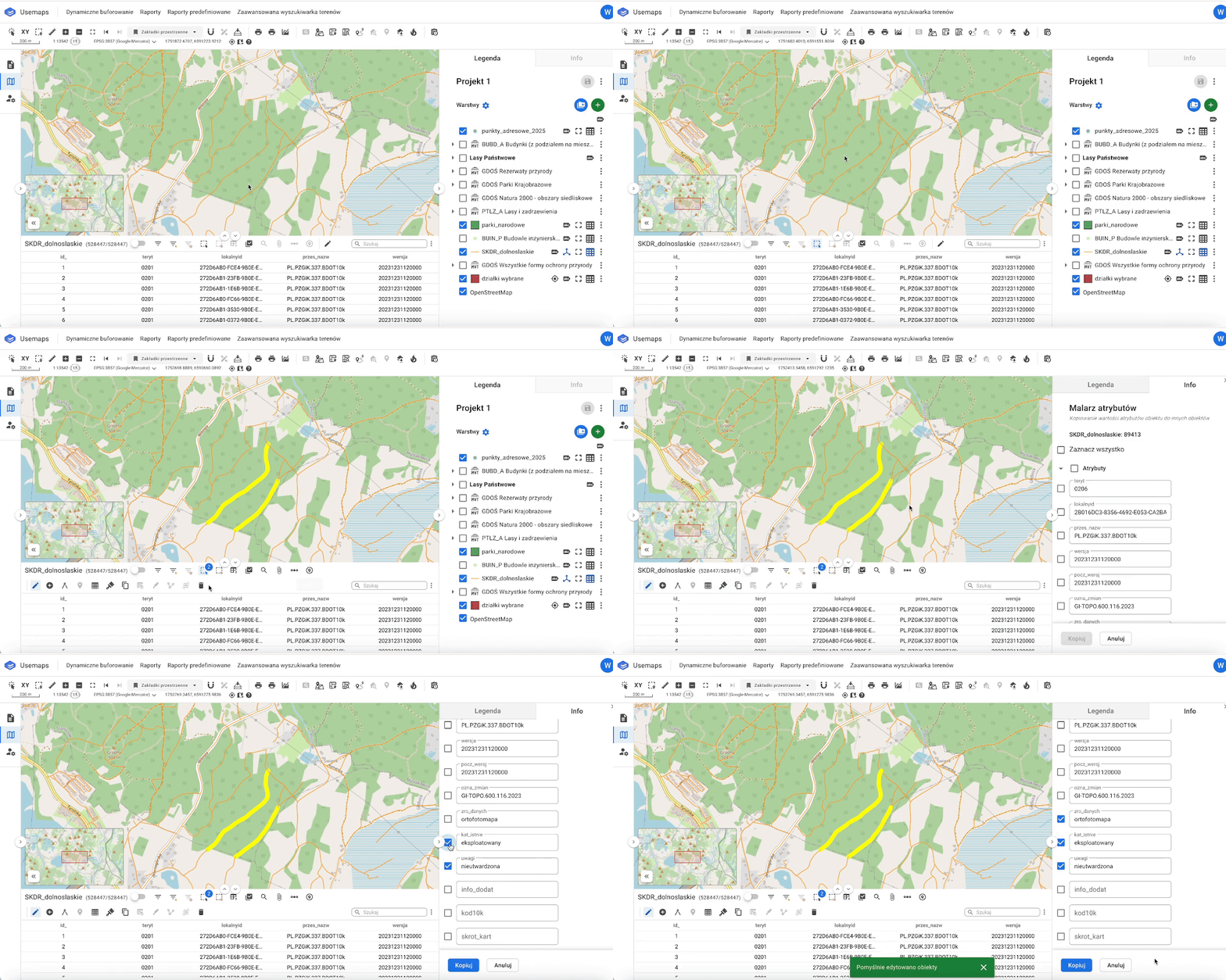
How It Works:
- Select the objects (they should be highlighted in yellow) that will receive the filled attributes
- Select the Attribute Painter tool from the Attribute Table Toolbar
- The cursor will change to a selector → point to the source object from which you want to copy attributes.
If there are multiple objects under the cursor, a list of objects will appear in the info panel for selection - After selecting a single source object, a configuration panel appears in the info panel – a list of attributes available for copying.
Select all attributes to copy or only the selected ones - Enter the buffer value in meters or select the attribute where you store the buffer values you want to generate.
- Click Copy > the attributes will be saved in the target object/objects
Assumptions:
The copied attributes overwrite existing values in the selected target object/objects.
Use case:
The user has drawn 10 new sewer connections and would like to copy attributes from an existing object that was added earlier and has all attributes fully completed.
More:
If you do not use the Attribute Painter to copy attributes, you can copy individual attribute values using the browser.