eye 0thumbs up 0thumbs down 0clock 7 April 2026
Usemaps + QGIS

Do you use QGIS?
Build an enterprise solution with Usemaps

Usemaps is a cloud built around QGIS. You still perform analyses, manage layers, and write scripts in the environment you know. Usemaps ensures your work is no longer invisible to the rest of the company. Management sees the project portfolio on the map. The project manager tracks the status of plots. The lawyer retrieves documents linked to specific locations. No one asks you for the “latest file.”

What does working with Usemaps look like?

Everyone works together on the same, up-to-date data.

In every organization that manages spatial data, there are at least three types of users. Until now, only one of them had access to the data.

GIS specialist
analyst · data administrator · GIS specialist

Works in QGIS - exactly as before.

Creates layers, performs analyses, manages data. With UseMaps, their work automatically goes to the cloud - visible to the entire organization. No file exports, minimal changes to workflow.

Benefits:

  • No more sending files and answering questions about the latest version
  • Data in the cloud with backup and full version history
  • Full control over who sees and edits what
  • Their role in the organization grows – they become the administrator of the company’s spatial knowledge
Subject-matter experts
project manager · inspector · technical department employee

Works with data - without needing to know QGIS.

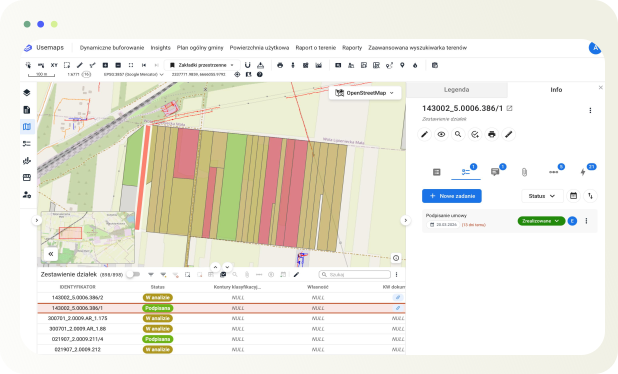
They see up-to-date data on the map in a browser. They add tasks, notes, and documents linked to specific objects or locations. No QGIS is needed - just a browser and the proper permissions.

Benefits:

  • Access to up-to-date data without asking a specialist
  • Tasks and documents linked to locations – not in a separate system
  • One view instead of Excel, email, and phone calls
  • Field work through the mobile app – with data updated instantly
Management
director · manager · department head

Sees what’s important - without the technical context.

Checks the status of projects, objects, and tasks on the map. Makes decisions based on current data - not a report prepared a week ago. No need to know what a shapefile is.

Benefits:

  • A view of the entire organization in one place
  • Decisions based on today’s data, not the last meeting
  • Status reports without involving the team in preparation
  • No entry barriers – just a browser, permissions, everything ready

Benefits of using QGIS with Usemaps

QGIS is an expert tool. Usemaps is the environment for the whole company.

Usemaps is a cloud built around QGIS. You still perform analyses, manage layers, and write scripts in the environment you know. Usemaps ensures your work is no longer invisible to the rest of the company. Management sees the project portfolio on the map. The project manager tracks the status of plots. The lawyer retrieves documents linked to specific locations. No one asks you for the “latest file.”

You decide who sees what - down to the layer.

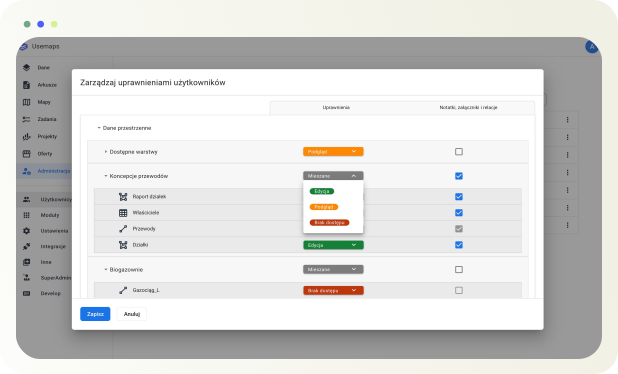
In QGIS, either someone has the file - or they don’t. There’s nothing in between. Usemaps introduces granular access control: each user gets exactly the data they should have. The GIS specialist edits layers. The project manager sees objects and adds tasks. The external client sees only the selected project. Management sees everything but read-only.

No installation. No “send me that file.” A browser is enough.

QGIS requires installation, configuration, and some knowledge to get started. That’s fine for a specialist - but it excludes everyone else. Usemaps works in a browser: open the link, log in, and see the map with up-to-date data. On a computer, tablet, or phone - no need to ask anyone for help.

A PDF with a map is just a snapshot. Usemaps is a live view of the data.

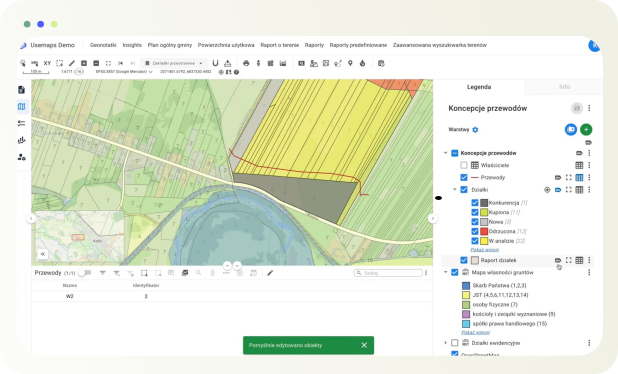
Exporting to PDF is the end of the data lifecycle - from the moment it is saved, the map becomes outdated and cannot be queried. Usemaps replaces static exports with interactive maps that can be shared with anyone: the client clicks on an object and sees its attributes, history, and documents. When the data changes, the map updates automatically.

We have answers to every question

I will have to abandon QGIS and learn a new tool.

QGIS and Usemaps are not two competing tools – they are two different layers of working with data. QGIS is your analytical environment. Usemaps is the cloud where that data lives and is accessible to the entire organization.

You install the plugin, connect to Usemaps, and work exactly as before. There is only one difference: your PM no longer messages you at 5:00 PM asking, “can you send me the latest project map”

It is quite the opposite. Today, data lives in files shared via email – and you really have no control over who has which version or what they do with it. In Usemaps, you as the administrator decide who can view, who can edit, and who can only download.

Management sees the map. The PM adds tasks. The lawyer downloads documents. No one touches your layers without your permission. And every change has a history – you know who modified what and when.

QGIS is free and will remain free – no one is changing that. But QGIS does not provide a cloud, access management for teams, change history, or a dashboard for management. It is a tool for a single user on one computer.

You don’t pay for GIS in Usemaps – you pay so that the entire team can use your work. Companies pay for Office 365 because collaboration and the cloud provide value that desktop tools alone cannot offer.

Request a quote

We will answer all your questions

Ask
for price

Ask
for price